 Instruo
Illustrative Workflow ROI Audit
See the operational work before deciding what to automate.
Review an evidence-rich preview covering a temporary-placement workflow, labour burden, root causes, future-state design, priorities and projected return.
Composite client example · Australian recruitment agency · Workflow ROI Diagnostic A$1,500 ex GST
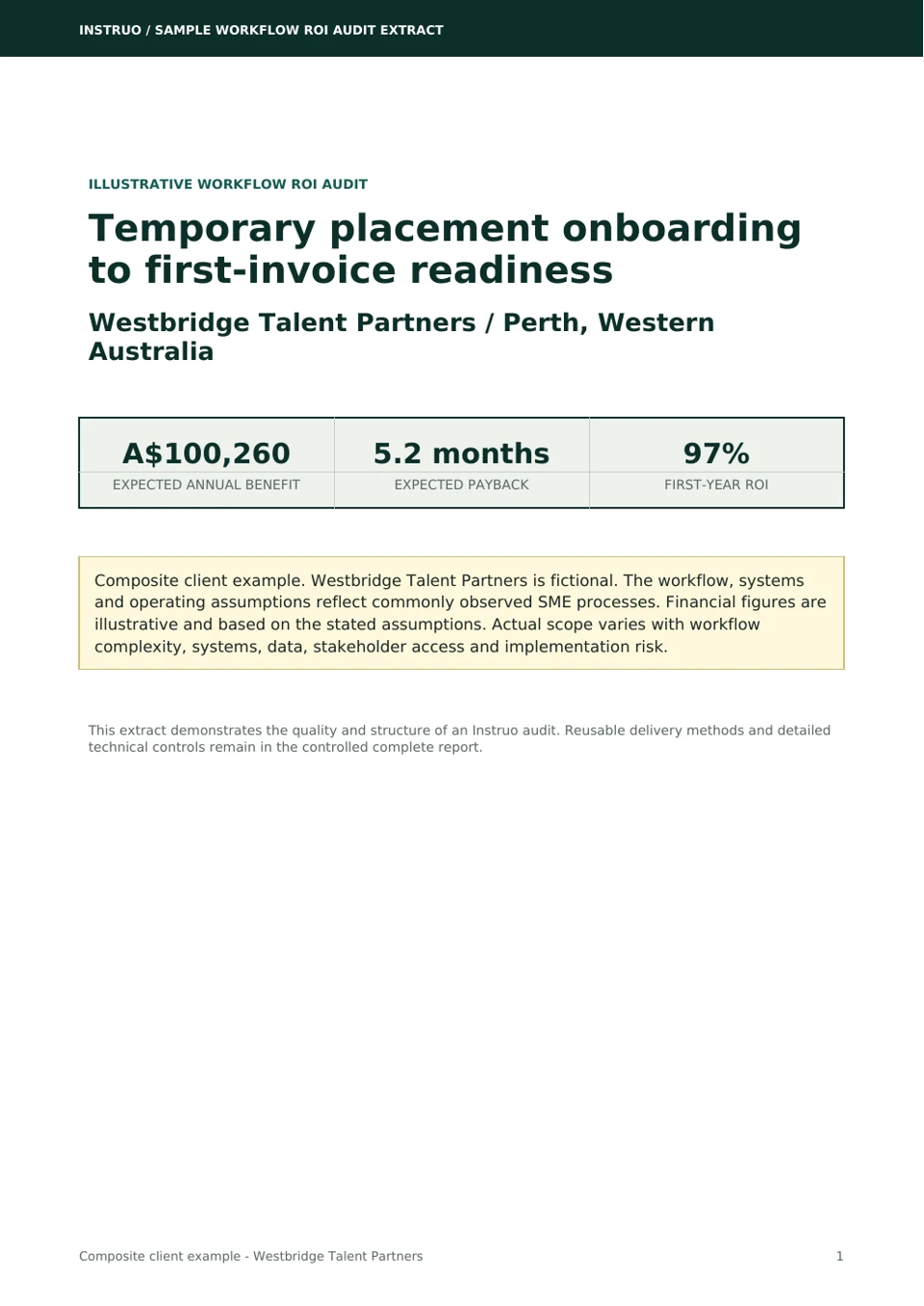
Composite client example. Westbridge Talent Partners is fictional. The workflow, systems and assumptions reflect commonly observed SME processes. Financial figures are illustrative and based on the stated assumptions. Actual audit scope varies with workflow complexity, systems, data, stakeholder access and implementation risk.
Executive summary preview
The problem is not recruitment. It is the work between approval and a clean first invoice.
Westbridge Talent Partners is an illustrative 18-person Perth recruitment agency with 11 consultants, four operations/payroll/finance staff and three leaders. It manages about 310 active temporary workers and 90 new placements each month.
Commercial profile:A$4.0-A$6.0 million annual net fee income and gross profit after temporary-worker wages and statutory on-costs; gross temporary-labour billings are higher and are not used in the ROI model.
Want the stage analysis, root causes, opportunity priorities and financial scenarios in report form?
View the Detailed Audit ExtractBusiness and systems
Each system works. The operating state between them does not.
JobAdder owns the placement, Microsoft 365 carries communication and evidence, Employment Hero Payroll holds the worker, Xero holds billing, and Excel informally carries progress.
JobAdder
Placement system and proposed source of truth
Required payroll and billing fields are not consistently complete.Microsoft 365
Communication, documents and controlled work queue
Shared mailbox and folders behave as informal workflow tools.Employment Hero Payroll
Worker and payroll record
Fields are re-keyed from forms and email.Xero
Client invoicing and accounting record
Placement and purchase-order data are copied manually.Current workflow preview
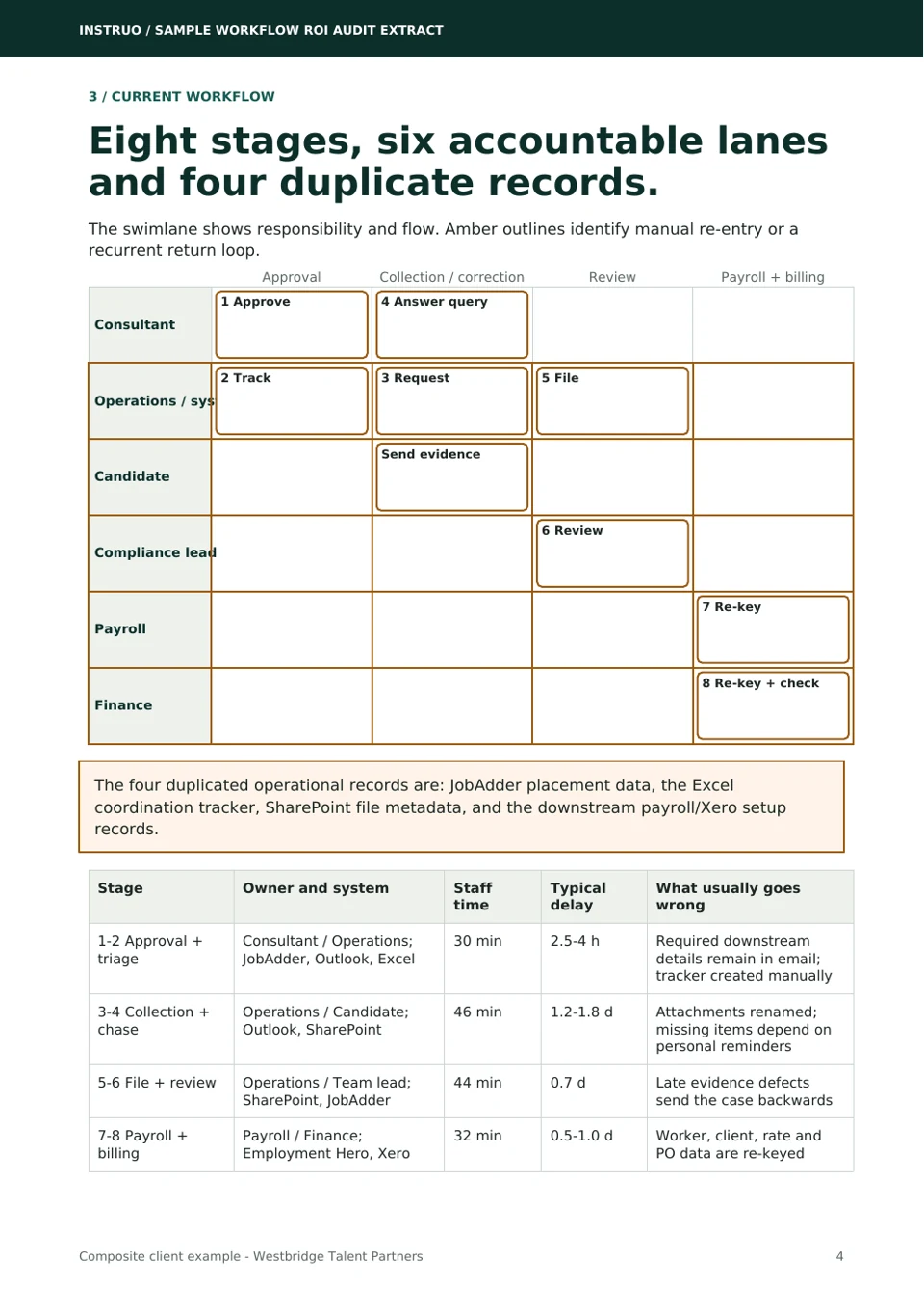
Eight stages across six accountable lanes.
The swimlane makes the handoffs, manual re-entry, candidate contact, late decisions and missing-information loop visible. The four duplicated operational records are identified rather than asserted.
Scroll horizontally to inspect every stage. Lane labels remain visible.
ConsultantApprove placementJobAdder; rate or PO may remain in email Answer queryEmail loop returns incomplete details
OperationsCreate tracker rowManual copy: JobAdder → Excel Request documentsOutlook; candidate contacted Rename and fileSharePoint copy + tracker update
CandidateSend evidenceIdentity, tax and bank data may remain in email
Team leadReview evidenceLate defect detection; return if incomplete
PayrollRe-key workerEmployment Hero Payroll
FinanceRe-key billingExcel → Xero; first invoice checked
Five principal findings
Approval is not completion
A placement can be approved while payroll, billing or evidence fields remain incomplete.
Four operational records drift
JobAdder, Excel, SharePoint metadata and downstream payroll/Xero setup are updated separately.
Errors appear late
Payroll and finance detect rate, purchase-order or identity problems after setup has started.
Email carries workflow state
Ownership, missing information and candidate follow-up depend on inbox searches and personal reminders.
Sensitive material is overexposed
Identity, tax and banking information may remain in a general shared mailbox longer than required.
Representative cost calculation
Every hour appears once in the calculation tree.
Rework labour is included inside total capacity. It is not counted again as a separate benefit.
Before143 min
→Expected62 min
Before24.5 h
→Expected8 h
Before4.8 days
→Expected≤2 days
Before61%
→Expected≥90%
Opportunity preview
Controls and orchestration rank ahead of broad automation.
The public preview shows the recommendation, not Instruo’s internal scoring formula. Overlapping opportunity values are never added together.
Higher impact ↑Higher effort →Completeness gateImplement first Onboarding caseImplement first Document collectionImplement first Draft invoicePhase two
Recommended future state
One placement event creates one visible case.
Automation validates, moves information and detects missed events. People retain compliance judgement, payroll approval, invoice approval and exception ownership.
Scroll horizontally to inspect every stage. Lane labels remain visible.
ConsultantApprove complete placementFailed validation returns here Receive milestoneNo status-chasing email
SystemsValidate required fieldsDuplicate check + unique case Remind and routeOnly incomplete cases Reconcile dailyMissed events and failures detected
CandidateSecurely provide evidenceConfirmation sent on receipt
Team leadJudge exceptionsHuman compliance decision
PayrollApprove payroll-ready outputSupported API or validated import
FinanceApprove draft invoiceXero remains accounting record
What automation does
Checks required fields, prevents duplicate cases, requests missing evidence, sends reminders, prepares controlled outputs and reconciles records.
What people still do
Correct placement details, make compliance decisions, approve payroll and invoices, and resolve exceptions with an accountable reason.
What this avoids
A fragile chain of unrelated automations, sensitive data in general logs and browser automation where a supported API or validated import exists.
Financial case preview
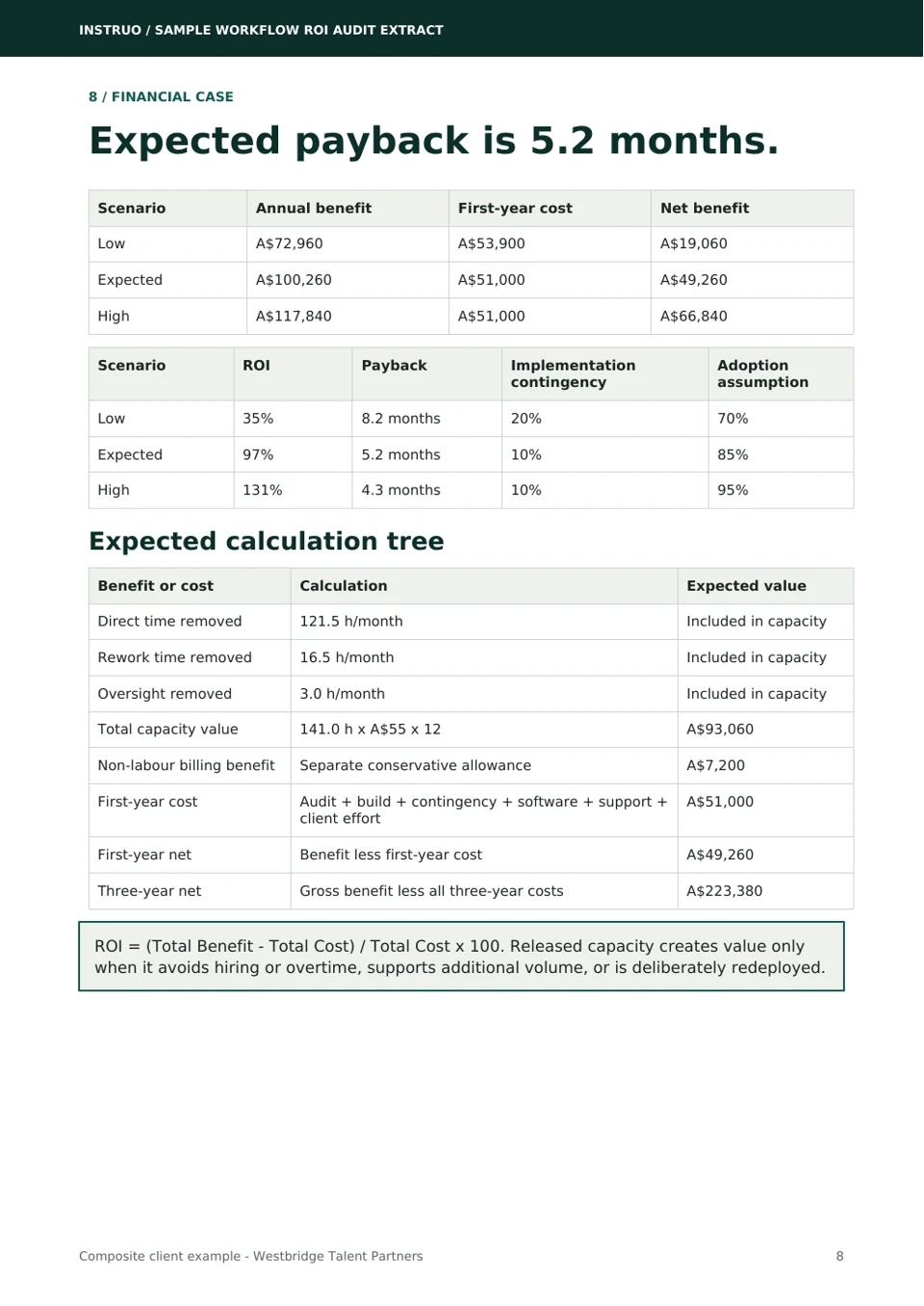
Illustrative expected payback is 5.2 months.
The model includes the A$1,500 audit, implementation, contingency, software, support and internal client effort. Capacity becomes value only if it avoids hiring or overtime, supports more volume or is deliberately redeployed.
- First-year cost
- $54K
- Net benefit
- $19K
- ROI
- 35%
- Payback
- 8.2 months
- First-year cost
- $51K
- Net benefit
- $49K
- ROI
- 97%
- Payback
- 5.2 months
- First-year cost
- $51K
- Net benefit
- $67K
- ROI
- 131%
- Payback
- 4.3 months
The extract includes the complete scenario assumptions, cost stack and three-year view.
Get the Sample Audit Extract90-day roadmap preview
Four phases, each with evidence required to proceed.
The complete delivery plan separates client responsibilities, Instruo responsibilities and decision gates.
Validate and prepare
Design gate: fields, scopes, controls and success measures accepted.
Build and test
Test gate: normal, duplicate, missing-data and integration-failure paths pass.
Deploy and stabilise
Release gate: owner signs off, open high risks closed, rollback tested.
Optimise
Outcome gate: benefit range refreshed using production evidence.
Sample Workflow ROI Audit Extract
See the detailed report structure without publishing the complete implementation playbook.
The gated 10-page extract demonstrates the client deliverable. Detailed field mappings, validation rules, failure handling and technical controls remain in the complete illustrative audit for qualified or manual sharing.
- Executive Summary
- Business and Audit Scope
- Current Workflow
- Cost of the Current Process
- Root Causes
- Prioritised Opportunities
- Recommended Future State
- Financial Case
- 90-Day Implementation Plan
- Final Recommendation
What a real diagnostic includes
Your current-state map, workflow burden, constraints, ROI range, priorities and a practical decision roadmap based on your people, systems and evidence.
What will differ
Scope, figures, risks and recommendations are specific to your workflow. This fictional composite is not a prediction, typical result or guarantee.
A standalone decision product
A$1,500 ex GST, generally delivered 7–10 business days after required inputs and access are available. You keep the findings whether or not you implement.
If Instruo recommends implementation, the diagnostic fee may be credited to a qualifying implementation of at least A$10,000 ex GST when the published eligibility conditions are met. Review the current high-level conditions.